
Configure a webhook
Learn how to configure a new webhook and start receiving events in your app.
This guide covers the programmatic integration approach. If you are using n8n, Make.com or Zappier, refer to the guide specific to your platform in Automation tools.
To start receiving webhook events in your app, create and register a webhook endpoint:
- Create a webhook endpoint handler to receive event data POST requests.
- Register your endpoint within Unipile using the Dashboard or the API
- Test that your webhook endpoint is working properly
- Secure your webhook endpoint to avoid malicious requests
- Debug and replay event deliveries using the Dashboard
- Deploy your webhook endpoint to production
- Register a new endpoint within Unipile with the production URL
Create a handler
In your local application, create a new route that can accept POST requests. This endpoint function must be setup to:
- Handles POST requests with a JSON payload containing an Event object
- Returns a successful status code (
2xx) in less than 5 seconds, before any complex logic that could cause a timeout.
If the endpoint does not return a successful status code (2xx) within 5 seconds—either because it returns an error or times out—the delivery is considered failed. Unipile retries the delivery after 2 seconds, then again after 12 seconds.
Example endpoint
// This example uses Express to receive webhooks
const express = require('express');
const app = express();

app.post('/endpoint', (request, response) => {
  const event = request.body;

  // Handle the event
  switch (event.type) {
    case 'message.new':
      const message = event.payload;
      // Then define and call a method to handle the ingestion of new messages.
      // handleNewMessage(message);
      break;
    default:
      console.log(`Unhandled event type ${event.type}`);
  }

  // Return a response to acknowledge receipt of the event
  response.json({ received: true });
});

app.listen(8000, () => console.log('Running on port 8000'));
Register your endpoint
Register your endpoint within Unipile using the Dashboard.
Forward events to a local endpoint
If you want to test an endpoint present on your local application, giving an URL with a localhost domain won't work. You must create a tunnel from a publicly available domain to your localhost server using a tool like Ngrok.
For exemple : https://8507-176-168-183-166.ngrok-free.app/endpoint
Register using the Dashboard
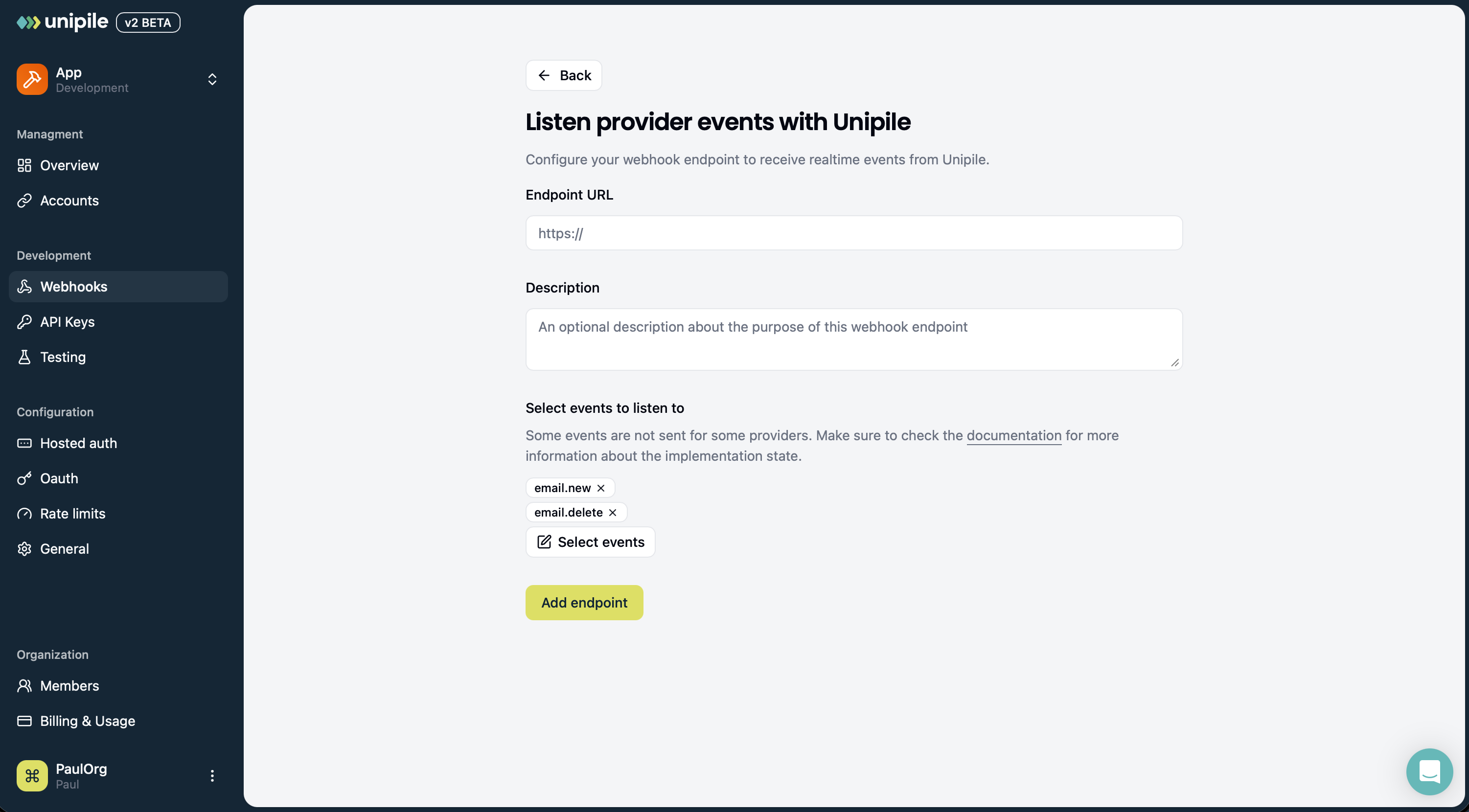
To register a new webhook endpoint :
- Open the Webhooks tab in Dashboard.
- Click Add endpoint.
- Provide the Endpoint URL for Unipile to send events to. Use the domain provided by Ngrok for local testing or your production application domain.
- (Optional) Describe the purpose of the webhook endpoint.
- (Optional) By default, events from all linked accounts are sent to your endpoint. You can restrict this by selecting a specific set of accounts that should emit events. This requires the accounts to be linked before creating the endpoint. You can later update this list using Update a Webhook Endpoint.
- Select Event types that you want to send to the webhook endpoint.
- Click Add endpoint.
Secure your endpoint
To make sure an incoming webhook was sent by Unipile and was not modified in transit, verify the unipile-signature header using your webhook secret.
You can find the secret for each webhook endpoint in the Unipile dashboard. It is also returned by the webhook endpoint API.
Signature header
Unipile sends a signature in the unipile-signature HTTP header:
unipile-signature: t=1710662400,v0=0123456789abcdef...The header contains:
t: Unix timestamp in seconds;v0: HMAC SHA-256 signature encoded as a hexadecimal string.
How to verify the signature
Compute the expected signature with HMAC SHA-256 using this format:
signed_payload = `${timestamp}.${raw_body}`
signature = HMAC_SHA256(endpoint_secret, signed_payload).hex()
The value sent by Unipile is:
t=${timestamp},v0=${signature}Verification flow
- Read the
unipile-signatureheader. - Extract
tandv0. - Read the raw HTTP request body exactly as received.
- Recompute
HMAC_SHA256(secret, "${t}.${rawBody}"). - Compare your computed signature with
v0using a constant-time comparison. - Reject the request if the signatures do not match.
- Optionally reject requests whose timestamp is too old.
Use the raw request body
You must verify the signature against the raw request body, not against a parsed JSON object serialized again.
These changes can break verification:
- changing whitespace;
- reordering JSON keys;
- changing escaping;
- parsing and reserializing the body before verification.
Recommended flow:
- capture the raw body;
- verify the signature;
- parse the JSON only after the signature is valid.
const crypto = require('crypto');
const express = require('express');

const app = express();
// Secret from dashboard
const endpointSecret = process.env.UNIPILE_WEBHOOK_SECRET;

app.post('/endpoint', express.raw({ type: 'application/json' }), (request, response) => {
  const signatureHeader = request.get('unipile-signature');

  if (!endpointSecret || !signatureHeader) {
    return response.status(400).send('Missing secret or signature header');
  }

  const parts = Object.fromEntries(
    signatureHeader.split(',').map((part) => {
      const [key, value] = part.split('=');
      return [key, value];
    }),
  );

  const timestamp = parts.t;
  const receivedSignature = parts.v0;

  if (!timestamp || !receivedSignature) {
    return response.status(400).send('Invalid signature header');
  }

  const rawBody = request.body.toString('utf8');
  const signedPayload = `${timestamp}.${rawBody}`;
  const expectedSignature = crypto.createHmac('sha256', endpointSecret).update(signedPayload).digest('hex');

  const isValidSignature =
    receivedSignature.length === expectedSignature.length &&
    crypto.timingSafeEqual(Buffer.from(receivedSignature), Buffer.from(expectedSignature));

  if (!isValidSignature) {
    return response.status(400).send('Invalid signature');
  }

  const maxAgeInSeconds = 300;
  const ageInSeconds = Math.abs(Math.floor(Date.now() / 1000) - Number(timestamp));

  if (!Number.isFinite(Number(timestamp)) || ageInSeconds > maxAgeInSeconds) {
    return response.status(400).send('Expired signature');
  }

  const event = JSON.parse(rawBody);

  switch (event.type) {
    case 'message.new': {
      const message = event.payload;
      // handleNewMessage(message);
      break;
    }
    default:
      console.log(`Unhandled event type ${event.type}`);
  }

  response.json({ received: true });
});

app.listen(8000, () => console.log('Running on port 8000'));
Deploy to production
When everything is working, push your handler code to production. Then, register a new endpoint, select the same events, but provide your production app endpoint URL.
Manage an existing endpoint
Open Webhooks, select the endpoint, and use its actions menu to update its URL, description, account selection, or event subscriptions. With the default all-accounts selection, new accounts in the application are included. An explicit account selection targets only those selected accounts; update it when you want to add more.
You can also enable, disable, or delete an endpoint from its menu. See Test and Debug Webhooks for those actions, delivery searches, timing measurements, retention, and replay.
Updated about 13 hours ago