
Proxies
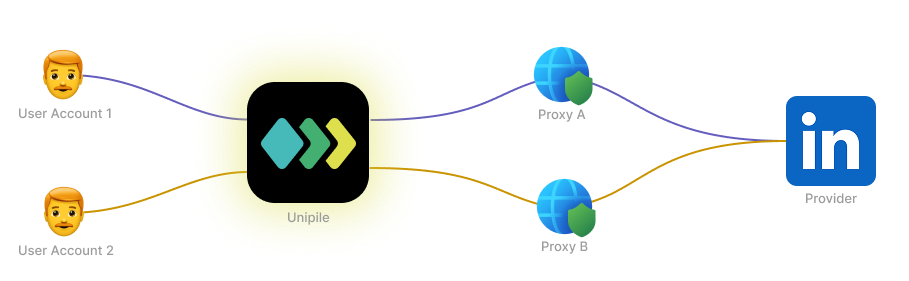
In Unipile, a proxy is a secure intermediary that routes requests between Unipile and external providers. When interacting with an Account, requests don’t have to go directly from Unipile’s servers to the provider’s API — they can be routed through a proxy instead to protect Accounts.
Automatic protection
Some providers closely monitor IP addresses used to access their services. If too many accounts connect from the same IP (e.g., Unipile’s servers), it may raise flags or trigger security measures.
To prevent this, Unipile automatically assigns proxies to accounts for certain sensitive providers. This helps distribute traffic and reduce the risk of accounts being flagged.
By default, Unipile pick a proxy located in a country near the user's IP if it's available, but you can choose a specific country or infer from a specific IP if needed. See Custom country for automatic proxies section below.
Automatic proxy protection is only enabled for providers that require it, currently:
For other providers, automatic protection is not necessary because they do not restrict access based on IP reuse.
In the dashboard, the proxy is shown as "Auto [COUNTRY]" in the list of Accounts.
Use a custom proxy
When linking an account, you can provide your own proxy configuration. We call this a custom proxy, as opposed to the automatic proxy assigned by Unipile.
Which proxy is applied follows a strict load order: the first match in the list is used, and the lookup stops there.
When using Hosted Auth with Create Auth Link
- Proxy entered by the user (if
config.global.allow_user_proxy_overrideistrue). - Proxy explicitly set in
config.{provider}.custom_proxy. - Automatic proxy (if enabled for the provider).
When using Custom Auth with Start Auth Intent
- Proxy explicitly set in
config.custom_proxy. - Automatic proxy (if enabled for the provider).
Handling errors
If the given custom proxy (Not automatic proxy) fails to forward requests to the provider:
- The Account status will switch to 🔴 Service Interruption
- A Webhook event
account.status.erroredwill be triggered, with the reason set toproxy.
Unipile will automatically retry requests until the proxy works again. However, you can manually provide a new proxy to restart the account connection immediately. See Update a proxy section below.
Custom country for automatic proxies
When an automatic proxy is assigned, Unipile determines its country using the following lookup order. The first matching value stops the resolution.
When using Hosted Auth with Create Auth Link
- Country chosen by the user (if
config.global.allow_user_country_overrideistrue). - Country inferred from the IP set in
config.{provider}.auto_proxy_config.ip. - Country explicitly set in
config.{provider}.auto_proxy_config.country. - Country inferred from the user’s own IP (default).
When using Custom Auth with Start Auth Intent
- Country inferred from the IP set in
config.auto_proxy_config.ip. - Country explicitly set in
config.auto_proxy_config.country. - Country inferred from the request’s IP (default).
No country fallbackIf no country can be determined, Unipile will assign the best available proxy at that moment, which may come from any region.
Strict proxy country
By default, if the currently selected proxy encounters an issue, Unipile will try to assign another proxy from the same country. If no proxy is available in that country, Unipile will fall back to the best available proxy, which may be located in another region.
If you want an account to use proxies exclusively from its configured country, set allow_country_fallback to false when linking the account using Create Auth Link or Start Auth Intent. You can also update this setting later using Update an Account.
When allow_country_fallback is set to false:
- During authentication, an error will be returned if no proxy is available in the configured country, instead of falling back to a proxy in another country.
- While the account is running, if its current proxy becomes unavailable and no other proxy is available in the configured country, the account will enter a service interruption state (
erroredstatus withreason: proxy) instead of switching to a proxy in another country.
Update a proxy
To change automatic proxy country or fallback settings from the account detail page, see Manage automatic proxy protection. For a disconnected account or a custom authentication setup, use Advanced Authentication.
To manage the proxy configuration of an Account, use the Update an Account API endpoint.
You can:
- Set or update a custom proxy for an Account.
- Replace automatic protection with a custom proxy.
- Remove a custom proxy — for providers with automatic protection, this will revert the Account to using Unipile’s automatic proxy. In this case, Unipile will assign the best available proxy at that moment, which may come from any region.
- Change the country used by Automatic Proxy Protection with
auto_proxy_country. This immediately selects a new automatic proxy in that country when one is available.
Note: You cannot remove the proxy entirely if automatic protection is required for the provider.
Automatic proxy settings cannot be changed while an account is
disconnected. Select the desired country during the reauthentication flow instead.
Countries
Here is the list of all available countries. During account authentication, if the country you explicitly selected, or the country inferred from the IP address, is not included in this list, the best available proxy will be assigned. This proxy may be located in any of the countries listed below.
| Code | Country |
|---|---|
| AE | United Arab Emirates |
| AO | Angola |
| AR | Argentina |
| AT | Austria |
| AU | Australia |
| BD | Bangladesh |
| BE | Belgium |
| BG | Bulgaria |
| BR | Brazil |
| CA | Canada |
| CH | Switzerland |
| CL | Chile |
| CN | China |
| CO | Colombia |
| CY | Cyprus |
| CZ | Czechia |
| DE | Germany |
| DK | Denmark |
| EE | Estonia |
| EG | Egypt |
| ES | Spain |
| FI | Finland |
| FR | France |
| GB | United Kingdom |
| GT | Guatemala |
| HK | Hong Kong |
| ID | Indonesia |
| IE | Ireland |
| IL | Israel |
| IN | India |
| IT | Italy |
| JP | Japan |
| KR | South Korea |
| KZ | Kazakhstan |
| MA | Morocco |
| MX | Mexico |
| MY | Malaysia |
| NL | Netherlands |
| NO | Norway |
| PA | Panama |
| PH | Philippines |
| PK | Pakistan |
| PL | Poland |
| PR | Puerto Rico |
| PT | Portugal |
| RO | Romania |
| SA | Saudi Arabia |
| SE | Sweden |
| SG | Singapore |
| TH | Thailand |
| TN | Tunisia |
| TR | Turkey |
| UA | Ukraine |
| US | United States |
| VN | Vietnam |
| ZA | South Africa |
Updated about 13 hours ago