
Rate Limits
Understand how Unipile enforces rate limiting to protect your integrations and stay within provider constraints. Learn how rules apply to methods, error handling, and configuration.
Overview
Each provider supported by Unipile (LinkedIn, Gmail, WhatsApp, etc.) applies its own rate limits to manage traffic and prevent abuse. If those limits are exceeded, the provider may temporarily block the account, flag it as suspicious, or restrict access — which can lead to degraded service or disconnections.
To avoid this and keep your integrations stable, Unipile enforces its own rate limiting at the Methods API level. Requests that exceed the allowed threshold are rejected by Unipile before they are sent to the provider. This:
- Protects your accounts from being throttled or banned by providers
- Keeps behavior consistent when calling external APIs
- Reduces the risk of errors caused by provider-side limits
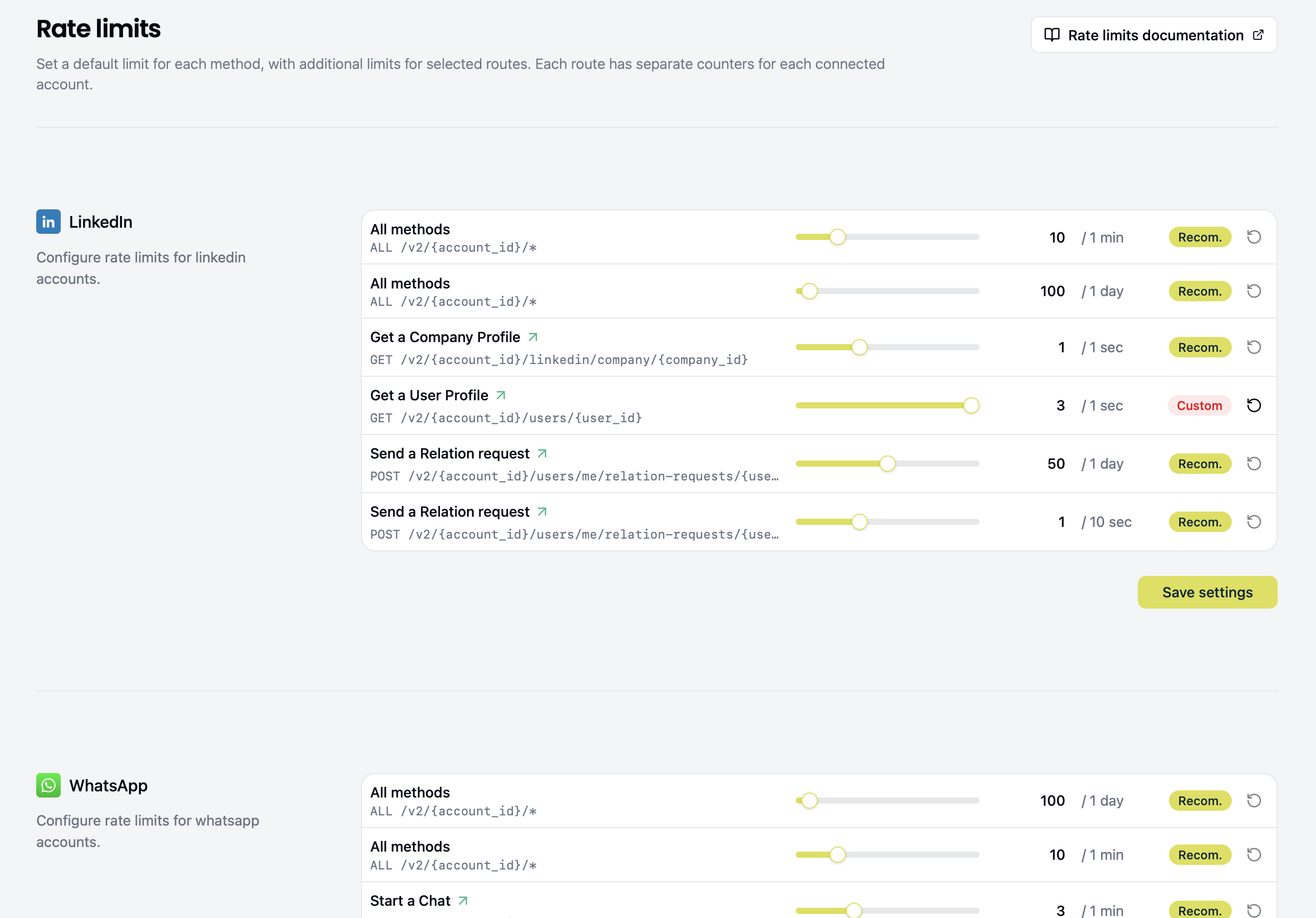
All configured rate-limit values and time windows are visible under Configuration → Rate limits in the Unipile Dashboard.
For provider-specific quotas and behavior recommendations, see Limits and Restrictions.
How rate limits apply to methods
The Dashboard can show three types of limit:
| Dashboard rule | Counter boundary |
|---|---|
| Per-account rate limit | Requests across all endpoints for one account share the same allowance. Shown when configured for the provider. |
| All methods | Each route has its own counter for each account, using a common allowance. |
| A named method | An additional counter for that specific route and account. |
A configured Per-account limit is checked before the route-level limits. For example, with an illustrative shared allowance of 100 requests, 60 calls to one route plus 40 to another use the account's entire allowance, even if neither route has reached its separate limit.
In the Dashboard, All methods shows a limit applied uniformly to every Methods API route. Each route has its own counter for each connected account: requests to one route do not use another route's allowance. A row showing a specific method adds a limit for that route only, such as sending a message or an invitation. It counts requests and uses time windows in exactly the same way as the All methods limit.
When a route has an additional limit, both route-level limits apply, in addition to any configured Per-account limit. After the Per-account check, Unipile checks the route-specific limit first, then the All methods limit for that route. If either is exceeded, Unipile rejects the request immediately with 429 Too Many Requests; the next limit is not checked for that request.
Each rule type can have up to two independent time windows, each with its own request allowance and reset time. For example, the Dashboard may show a one-minute and a one-day window for the same limit. A request must fit within every applicable window to proceed. Within the route-level limits, shorter windows are checked first. When one window rejects a request, later windows and limits are not checked for that request.
These are rate limits, not calendar-based quotas. Each limit uses a rolling fixed window that starts with the first request when no window is active. Its duration is fixed from that request; later requests count toward the same window without moving its expiry. Once it expires, the next request starts a new window. For example, if a one-minute window starts at 14:23:17, it expires at 14:24:17, not at 14:24:00. Likewise, a one-day window lasts 24 hours from its first request; it does not reset at midnight. Counters are separate for each connected account, so requests for one account do not use another account's allowance.
Good to know
- Each provider has its own constraints. For example, some providers apply stricter limits than others when sending messages, so rate limit configurations may vary by provider.
- Requests served from cache do not count toward rate limits because they are not forwarded to the provider. See Manage Cache for details.
Examples
The values below are illustrative; your provider's configured limits are shown in the Dashboard.
Suppose All methods allows 100 requests per day. For one connected account, GET /chats and POST /chats/{chat_id}/messages/send each have their own counter. If the GET requests are not served from cache, the 101st GET /chats request in its active day window is rejected, but those GET requests do not use the send-message route's allowance.
Now suppose the send-message route also allows 10 requests per minute. Its 11th request in the active minute window is rejected by the route-specific limit, even though the All methods window still has room. If 100 send-message requests are spread across the day without exceeding 10 in any minute, the next request can instead be rejected by the All methods limit, even when the route-specific minute window has room.
When you exceed the limits
API response
When a Unipile rate limit rejects a request, the API returns:
- HTTP status:
429 Too Many Requests - Error type:
api/too_many_requests
The response body follows the standard error shape (RFC 7807), including type, title, detail, and req_id.
Check the error type
provider/too_many_requestsmeans the provider's own rate limit was reached, not Unipile's. Unipile does not control that limit. This often happens when a Unipile limit has been set too high to stop requests before they reach the provider's threshold. The response-header guidance below applies to Unipile's rate limiter: for a429, use it only whentypeisapi/too_many_requests. Even ifx-ratelimit-*headers appear on a provider429, they do not describe the provider's limit or give a reliable provider retry time.
Read the response headers
Unipile's x-ratelimit-* headers describe the request allowance and reset time for one window. A request that Unipile rejects with 429 (type: api/too_many_requests) also includes retry-after:
| Header | Meaning |
|---|---|
x-ratelimit-limit | Maximum requests allowed in the window shown. |
x-ratelimit-remaining | Requests left in that window. |
x-ratelimit-reset | Seconds until that window expires. |
retry-after | Seconds to wait before retrying after a Unipile 429. |
For a request evaluated by Unipile's rate limiter, an accepted response shows the last applicable window checked. A Unipile 429 shows the first window that rejected the request. The headers do not identify whether that window belongs to a Per-account, All methods, or additional route-specific limit, and they do not report the state of other applicable windows. Compare the limit and window with the values in the Dashboard, but do not assume a matching value uniquely identifies the rule. See the header reference for details.
For example, an accepted request might return:
HTTP/1.1 200 OK
x-ratelimit-limit: 50
x-ratelimit-remaining: 12
x-ratelimit-reset: 24
This window allows 50 requests, has 12 remaining, and expires in 24 seconds. You can slow requests as the remaining count falls. Another applicable window could still reject a request sooner.
Example: both limits reached
Suppose a send-message route has an additional limit of 10 requests per minute and the All methods limit is 50 requests per day. If both windows are full, the route-specific window rejects the next request first. A response could include:
HTTP/1.1 429 Too Many Requests
x-ratelimit-limit: 10
x-ratelimit-remaining: 0
x-ratelimit-reset: 34
retry-after: 34
Wait at least 34 seconds before retrying. These headers describe only the route-specific window in this example. Once it expires, the All methods window may still reject the next request with its own retry-after value.
Example: two windows for one limit
Suppose All methods has 5 requests per minute and 100 requests per day, with no additional limit on the requested route. If the minute window is full, a 429 shows x-ratelimit-limit: 5 and the minute window's retry-after. If the minute window later expires while the day window remains full, the next request can return a 429 with x-ratelimit-limit: 100 and the day window's retry-after. In each case, follow the retry-after in the response you received; the earlier response did not report the other window's state.
Provider rate limits
When the provider’s rate limiter is hit (for example, because it uses a different or stricter window), the API returns:
- HTTP status:
429 Too Many Requests - Error type:
provider/too_many_requests
A provider/too_many_requests response means the request reached the provider. Unipile cannot reliably determine when the provider will accept another request, so its retry timing is less predictable than for api/too_many_requests.
Configuring rate limits
The values shown in the Dashboard start with recommended defaults based on each provider's limits. You can adjust a configured Per-account limit, an All methods limit, or a limit for a specific route, and reset a customized value to the recommendation.
- Open Configuration → Rate limits and find the provider.
- Move a rule's slider, or click its numeric value to enter a value within the displayed bounds.
- To restore a recommendation, use that rule's reset action.
- Save the provider section. Editing a value or selecting reset does not persist it until you save.
A Recommended or Custom badge identifies the value currently shown. Rule durations are displayed beside their allowances; the Dashboard lets you customize request counts within the available minimum and maximum values.
Increasing a limit means accepting the risk that requests reach the provider's rate limiter and return provider/too_many_requests. Unipile tracks provider rate limit changes and updates its recommended defaults to stay aligned with upstream constraints.
If a customized limit causes a provider 429, Unipile cannot provide a reliable retry time for that response. Use the recommended values when predictable retry behavior matters.
Related topics
- Manage Cache — Reduce provider calls and rate limit hits by using cached GET responses
- Error responses — Full list of error types and how to handle them
- Limits and Restrictions — Provider-specific quotas and best practices
Updated about 13 hours ago