
Connection Status
The connection status indicates whether Unipile can access data from the provider. Once an account is linked, it is considered operational and begins operating normally. However, certain expected scenarios can cause the connection to drop. Your application should monitor these cases so you can notify users and prompt them to take the appropriate action.
Provider connectivity is a dynamic dependencyA linked account is operational at the time it is connected, but continuous provider connectivity is not guaranteed. Read Building on third-party providers for the availability model, or go to Troubleshoot Connection Issues if an account is currently unavailable.
Monitoring these statuses and handling their transitions is a required part of the client application's integration. Unipile cannot prevent provider-controlled interruptions, and applications remain responsible for handling them without allowing unrelated functionality to fail.
Accounts and Products
An account represents the identity linked to Unipile for a provider. A product is a provider capability whose connection is monitored independently within that account. For example:
- A Google account can contain Gmail and Calendar products.
- An Outlook account can contain Mail and Calendar products.
- A LinkedIn account can contain Classic, Sales Navigator, and Recruiter products, depending on the user's subscriptions and the products connected.
Most providers expose a single product, so the product-level distinction is not visible. When an account contains several products, the product statuses are the most useful information for understanding what your integration can actually use.
| Scope | Field | Possible values |
|---|---|---|
| Product | metadata.products_connection_status.{product} | running, disconnected, errored |
| Account | status | running, disconnected, errored, partial, degraded |
| Account API access | is_locked | true, false |
On a multi-product account, the product statuses describe each connection independently. On a single-product account, metadata.products_connection_status can be omitted and the top-level account status directly represents that sole connection.
The top-level account status is derived from the product statuses and provides a convenient summary for account lists and filters. It does not replace the product statuses when you need to know which provider capabilities are available.
partial and degraded are aggregate statuses that exist only on the account. They are never values of metadata.products_connection_status.
Inspect statuses in the Dashboard
On the Accounts page, open Display options to switch between the Accounts and Products views:
- Accounts shows one row per account with its aggregate status.
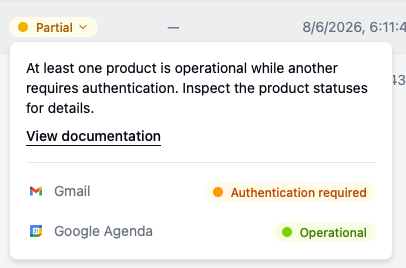
- Products shows one row per product with its individual connection status.

Select a status badge in either view to see its explanation, the affected product, the error reason when available, and the recommended action. Open the account detail page for its history and configuration. See Manage Provider Accounts for reconnection actions, metadata, and proxy controls.
Product connection statuses
Every product has one of three connection statuses: running, disconnected, or errored. On a multi-product account, use metadata.products_connection_status as the primary source for deciding which API Methods and realtime events are available.
The account can also have one of these three statuses, depending on the overall combination of product statuses described below.
🟢 Operational
At product level, the product status is running: that product is operational.
At account level, status is running when all configured products are operational.
You should be able to call the API Methods and receive the realtime events provided by each operational product.
When an account is first linked
A newly linked account is immediately running. Once authentication returns an Account object, it is ready to receive API Method calls and realtime events; do not wait for an account.status.running webhook.
Use the account.add webhook to record that the new account was added. It is the lifecycle event emitted for a newly linked account, and its payload already contains the running account.
account.status.running is emitted when an existing account or one of its products returns to operational status. It is not emitted when a new account is linked.
🟡 Authentication required
At product level, the product status is disconnected: its credentials or session may have expired or been revoked, or the user may not have access to that product. That product requires authentication or reconfiguration.
At account level, status is disconnected when no product is operational and at least one product requires authentication.
Why accounts get disconnected and require authentication ?
In many cases, it can be obvious, but in some others, it can be because of a bad implementation. Here is all the cases where accounts require authentication:
- The owner change his password
- The owner revoke access / terminate session to your app from the provider settings
- The owner use a platform feature to logout the account from everywhere
- The account was not used for a long time
- Your app does not respect the provider's Limits and Restrictions and make too many requests to sensitive endpoints.
- The account is not warmed up. For exemple, new accounts sending messages in bulk can be suspicious.
- When using cookies authentication method, the owner logout from the browser used to retrieve the cookies.
- When using cookies authentication method, the user agent is wrong.
API Methods that depend on a disconnected product should return a 401 - provider/invalid_authorization error, and you won't receive any more realtime events from that product except account status events. Other running products remain available. If the top-level account status is disconnected, no product is operational.
What to do ?
Your application should listen for the account.status.disconnected webhook, clearly tell the user that authentication is required, and make a reconnection action available in your interface. The owner of the account must then authenticate again using the Provider Authentication API.
Pass the existing account_id in Create Auth Link if you are using Hosted Auth, or in Start Auth Intent if you are using Custom Auth. This reconnects the existing account instead of creating a new one.
The user must authenticate with the same provider account that is already linked to this account_id. If they
authenticate with a different identity, the reconnection returns 401 - provider/account_mismatch and the existing
account remains unchanged. Ask the user to retry with the original provider account, or link a new Unipile account if
they intend to connect a different identity.
Then the account should be back to Operational.
🔴 Service interruption
At product level, the product status is errored: that product has a service interruption.
At account level, status is errored when no product is operational and all configured products have a service interruption. This can occur if:
- The Proxy used between Unipile and the provider is down
- The provider is down
- Unipile encounter infrastructure issues
Realtime events stop for the affected product except account status events. API Methods that depend on that product might work in some cases; otherwise, they should return 5xx error codes. Other running products remain available. If the top-level account status is errored, no product is operational.
What to do ?
In this case, Unipile will automatically try to bring accounts back to Operational using retries.
- If the reason is the proxy, you can provide a new one (See Proxys guide).
- For other reasons, the only thing you can do is warn your users about it and wait until the account is back to
running. - Most of the time, removing the account then link it again will NOT fix the issue faster.
Account-only aggregate statuses
The following statuses exist only at the top-level account status. They appear when a multi-product account contains a mix of product connection statuses. Always inspect metadata.products_connection_status to determine the state of each product and decide which capabilities remain available.
🟡 Partial
status is partial.
At least one product is operational while another requires authentication.
Inspect metadata.products_connection_status to determine which product is running, disconnected, or errored. API Methods and realtime events remain available for operational products.
Listen for account.status.partial to detect the aggregate status change and for account.status.disconnected to identify the product that requires authentication. Reconnect the existing account to restore all configured products. Reconnecting refreshes the entire account and restarts every configured product.
🟠 Degraded
status is degraded.
At least one product is operational while another has a service interruption. No product requires authentication.
Inspect metadata.products_connection_status to identify the affected product. API Methods and realtime events remain available for operational products. Unipile automatically retries the products in error.
Listen for account.status.degraded to detect the aggregate status change and for account.status.errored to identify the affected product and its error reason.
🔒 API access locked
is_locked is true.
API access to the account has been locked because the organization does not have an active subscription. Locking is independent of the connection status: for example, an account can remain running while is_locked is true.
You won't receive any more realtime events from this account. Calling API Methods should return a 403 - api/inactive_subscription.
What to do ?
Make sure your subscription is active and there are no pending payments. Listen for account.locked and account.unlocked to track changes to API access.
Track connection status
To keep track of account lifecycle, configure a webhook for account.add, account.status.*, account.locked, and account.unlocked events.
For multi-product accounts:
account.status.running,account.status.disconnected, andaccount.status.erroredcan describe a product transition. Their optionalproductfield identifies the product concerned.account.status.partialandaccount.status.degradeddescribe only the aggregate account status. They are emitted when the combination of product statuses changes the account summary.account.lockedandaccount.unlockeddescribe API access to the account, independently of both account and product connection statuses.
Use status events together with metadata.products_connection_status; the account-level summary alone does not identify every available or unavailable product. Treat account.add as the ready signal for a newly linked account; account.status.running is only emitted for an existing account or product. Learn more about the different events in Event types.
Updated about 13 hours ago