
OAuth Flow
Integrate authentication for provider that use a standard OAuth flow.
This flow is used by Google and Outlook.
To authenticate users using the OAuth flow:
- Create a "Sign In" button that requests an OAuth URL by calling the Start Auth Intent endpoint.
- Redirect the user to the OAuth URL returned by the API.
- Set up a callback route in your application to receive the redirect after the provider’s OAuth flow is complete.
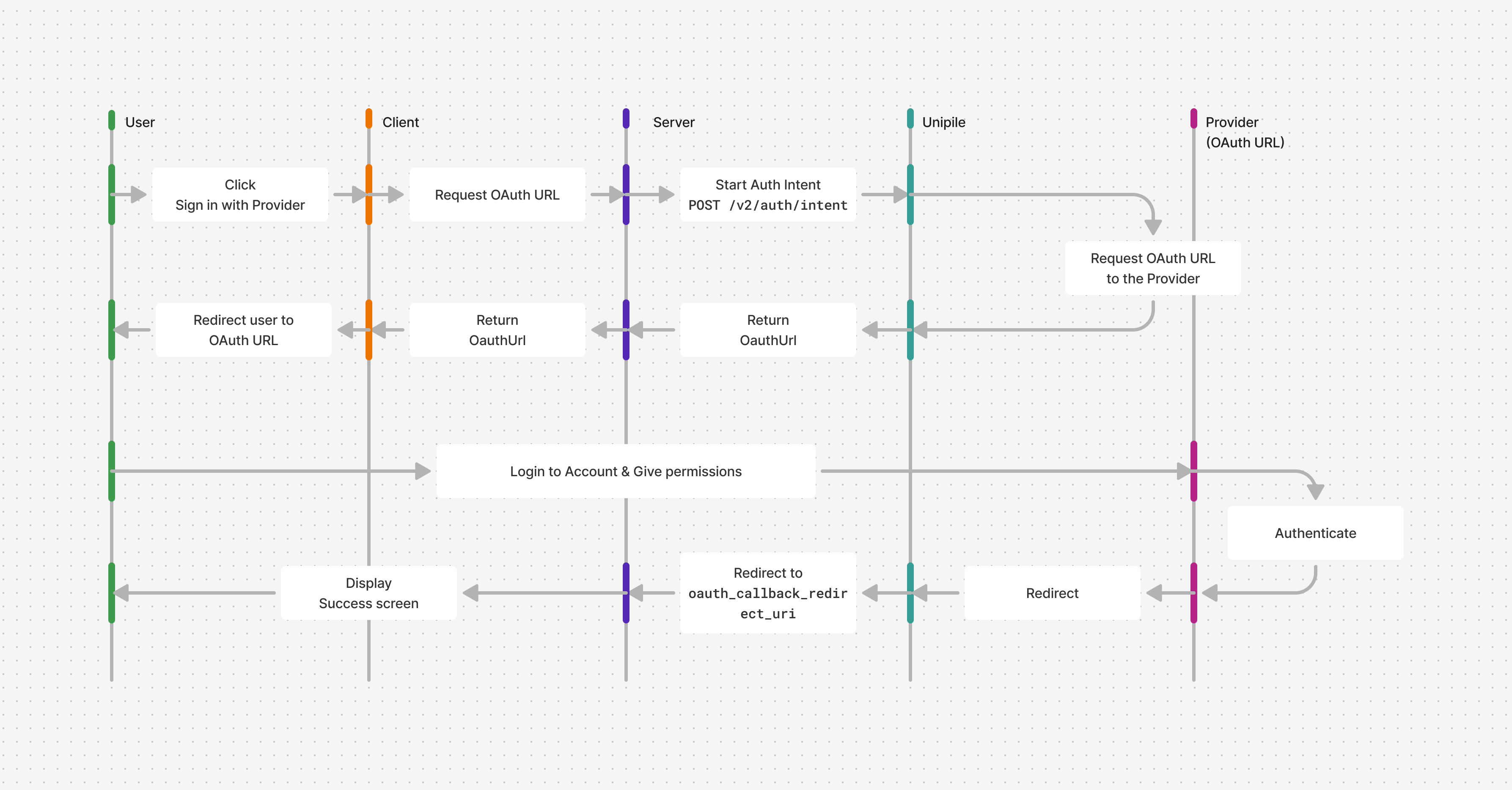
Get an OAuth URL
In your frontend, create a page with a "Sign In" button.
Branding GuidelinesMake sure to follow the branding rules of the respective providers
Next, create a backend route to handle the button click. This route should:
- Call Start Auth Intent
Pass theprovidername and theoauth_callback_redirect_uri.
For example, during local development:http://localhost:3000/oauth-callback. In production, use your actual domain name. - Redirect the user to the
OauthUrlreturned by the API response.
Server code
// index.ts

import express, { Request, Response } from "express";
import cors from "cors";
import parser from "body-parser";
import "dotenv/config";

import { UnipileCustomAuth, UnipileAccounts } from "unipile";

const key = process.env.UNIPILE_API_KEY ?? "";

const customAuthApi = new UnipileCustomAuth({ key });
const accountsApi = new UnipileAccounts({ key });

const app = express();

app.use(cors());

app.use(parser.json());
app.use(parser.urlencoded({ extended: true }));
app.use(express.json());

app.post("/auth-intent", async (req: Request, res: Response) => {
  const response = await customAuthApi.startAuthIntent({
    body: req.body,
  });

  // Handle Errors
  if (response.error) {
    res.status(response.response.status).send(response.error);
    return;
  }

  res.send(response.data);
});

app.listen(3000, () => {
  console.log("Server is running on port 3000");
});
curl --request POST \
--url https://api.unipile.com/v2/auth/intent \
--header 'X-API-KEY: api-key' \
--header 'accept: application/json' \
--header 'content-type: application/json' \
--data '
{
"provider": "google",
"oauth_callback_redirect_uri": "http\\://localhost:3000/oauth-callback"
}
'# main.py
import json
import os
from typing import Any, Optional
import unipile
import uvicorn
from dotenv import load_dotenv
from fastapi import Body, FastAPI
from fastapi.middleware.cors import CORSMiddleware
from fastapi.responses import JSONResponse, PlainTextResponse, Response
from unipile.api.accounts_api import AccountsApi
from unipile.api.custom_auth_api import CustomAuthApi
from unipile.exceptions import ApiException
load_dotenv()
key = os.getenv("UNIPILE_API_KEY", "")
configuration = unipile.Configuration()
if key:
configuration.api_key["apiKey"] = key
api_client = unipile.ApiClient(configuration)
custom_auth_api = CustomAuthApi(api_client)
accounts_api = AccountsApi(api_client)
app = FastAPI()
app.add_middleware(
CORSMiddleware,
allow_origins=["*"],
allow_credentials=True,
allow_methods=["*"],
allow_headers=["*"],
)
def _to_response_data(value: Any) -> Any:
if hasattr(value, "to_dict") and callable(value.to_dict):
return value.to_dict()
return value
def _api_exception_to_body(exception: ApiException) -> Any:
if exception.data is not None:
return _to_response_data(exception.data)
if exception.body:
try:
return json.loads(exception.body)
except json.JSONDecodeError:
return exception.body
return exception.reason or "Unknown error"
def _error_response(exception: ApiException) -> Response:
status_code = exception.status or 500
body = _api_exception_to_body(exception)
if isinstance(body, (dict, list)):
return JSONResponse(status_code=status_code, content=body)
return PlainTextResponse(status_code=status_code, content=str(body))
@app.post("/auth-intent")
def auth_intent(body: Any = Body(...)) -> Response:
try:
params = custom_auth_api._start_auth_intent_serialize(
start_auth_intent_request=body,
_request_auth=None,
_content_type=None,
_headers=None,
_host_index=0,
)
response_data = custom_auth_api.api_client.call_api(*params)
response_data.read()
response = custom_auth_api.api_client.response_deserialize(
response_data=response_data,
response_types_map={"200": "SolveCheckpoint200Response"},
).data
return JSONResponse(content=_to_response_data(response))
except ApiException as exception:
return _error_response(exception)
if __name__ == "__main__":
uvicorn.run("src.main:app", host="0.0.0.0", port=4000, reload=True)
Client code
// lib/unipile.ts

import type {
  StartAuthIntentData,
  StartAuthIntentResponse,
} from "unipile";

export async function startAuthIntent(body: StartAuthIntentData) {
  const response = await fetch("http://localhost:4000/auth-intent", {
    method: "POST",
    headers: {
      "Content-Type": "application/json",
    },
    body: JSON.stringify(body),
  });

  if (!response.ok) {
    const error = await response.text();
    throw new Error(error);
  }

  const data = await response.json();

  return data as StartAuthIntentResponse;
}


// components/containers/OAuthFlowContainer.tsx

import { startAuthIntent } from "../../lib/unipile";

export function OAuthFlowContainer({
  provider,
}: {
  provider: "outlook" | "google";
}) {
  const handleClick = async () => {
    const response = await startAuthIntent({
      provider,
      oauth_callback_redirect_uri: "http://localhost:3000/oauth-callback",
    });


    // Redirect the user to the given url
    if (response.object === "OauthUrl") {
      window.location.href = response.url;
    }
  };

  return <button onClick={handleClick}>Sign in with {provider}</button>;
}

// App.tsx

import { OAuthFlowContainer } from "./components/containers/OAuthFlowContainer";

export function App() {
  return <OAuthFlowContainer provider="google" />
}
Create a callback route
After completing the OAuth flow, the provider will redirect the user to your callback route.
This route should be a GET endpoint that accepts the following query parameters:
| key | description |
|---|---|
account_id | ID of the linked account |
provider | Provider of the linked account |
state? | (Optional) The same state you passed to Start Auth Intent , which you can use to validate the authenticity of the call. |
Once this route is hit, you should:
- Redirect the user to a success screen
- Call Get an Account using the
account_idto retrieve and display additional account details.
Server code
// index.ts

//...

app.get("/oauth-callback", async (req: Request, res: Response) => {
  const account_id = req.query.account_id;
  if (typeof account_id !== "string") {
    res.status(400).send("Missing account_id");
    return;
  }

  // Get the full Account object from the account_id given in the query
  const response = await accountsApi.getAccount({ path: { account_id } });

  // Handle Errors
  if (response.error) {
    res.status(response.response.status).send(response.error);
    return;
  }

  res.send(
    `Account ${response.data?.name ?? response.data?.id} is successfully authenticated`,
  );
});
# main.py
# ...
@app.get("/oauth-callback")
def oauth_callback(account_id: Optional[str] = None) -> Response:
if account_id is None:
return PlainTextResponse(status_code=400, content="Missing account_id")
try:
response = accounts_api.get_account(account_id)
except ApiException as exception:
return _error_response(exception)
account_name = response.name or response.id
return PlainTextResponse(
content=f"Account {account_name} is successfully authenticated"
)
# ...
You need a server to redirect usersHandle callback errors
If the account cannot be linked with unipile, the error is given as query parameters. This route should also accept the following:
| key | description |
|---|---|
error_type | Type of the error. See Error responses |
error_title | Title of the error |
error_detail | Detail of the error |
Then, you can handle errors gracefully:
- Duplicate and Restricted Accounts errors as mentioned in Accounts Linking Limitations.
- Other unexpected errors
Server code
// index.ts

//...

app.get("/oauth-callback", async (req: Request, res: Response) => {
  let q = url.parse(req.url, true).query;

  if (q.error_type) {
    console.log('Error:' + q.error_title);

    if (q.error_type === "api/already_exists") {
      // Handle duplicate accounts
      console.log("Existing account", q.error_detail) // acc_xxxxx
    }

    if (q.error_type === "api/restricted_account") {
      // Handle restricted accounts
      console.log("Reason", q.error_detail) // reason
    }

    // Handle unexpected errors


  } else {
    // Get the full Account object from the account_id given in the query
    const response = await unipile.accounts.getAccount(
      q.account_id
    );

    // Handle error
    if (response.error || !response.data) {
      console.error(response.error);
      res
        .status(response.error?.status || 500)
        .send(response.error?.type || "Internal Server Error");

      return;
    }

    res.send(`Account ${response.data.name} is successfully authenticated`);
  }
});
You need a server to redirect usersUpdated 5 months ago