
Unsupported features
The following LinkedIn features are not supported by Unipile and are outside the scope of this guide.
Although we handle a large number of LinkedIn features, you may need to use certain specific use cases that we don't yet cover.
To compensate for this, we encourage you to use the following endpoint : Perform a Request to any LinkedIn API Endpoint. To utilize this route, you will need to identify the specific endpoint containing the desired data using your browser developer tools on LinkedIn, and then copy the URL along with its possible parameters and body for implementation.
Here is the equivalent SDK usage for this proxy endpoint:
const { data } = await linkedInApi.proxyRequest({
  path: {
    account_id: "acc_123456789",
  },
  body: {
    method: "GET",
    url: "https://www.linkedin.com/voyager/api/graphql",
    query_params: {
      variables: "(keyword:arnaud,types:List(CONNECTIONS))",
      queryId: "voyagerMessagingDashMessagingTypeahead.47f3aa32ab0b43221f99db7c350a2cc3",
    },
    bypass_url_encoding: true,
  },
});
response = linked_in_api.proxy_request(
"acc_123456789",
{
"method": "GET",
"url": "https://www.linkedin.com/voyager/api/graphql",
"query_params": {
"variables": "(keyword:arnaud,types:List(CONNECTIONS))",
"queryId": "voyagerMessagingDashMessagingTypeahead.47f3aa32ab0b43221f99db7c350a2cc3",
},
"bypass_url_encoding": True,
},
)Mastering the "Magic" route
Identify the Linkedin enpoint
- Open your browser's Developer Tools and go to the Network tab to capture all requests.
- Perform the action for which you want to collect data.
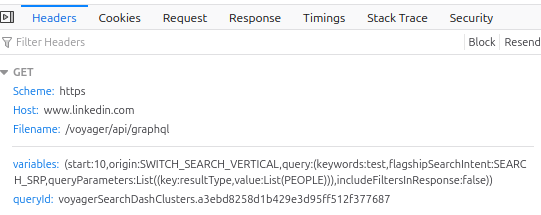
- Identify which request corresponds to the action on LinkedIn, then click it to view the details.
Build the request
- Construct the request by selecting the relevant data. In the example above, you will need to extract the http method (
GET), the request URL (http://www.linkedin.com/voyager/api/graphql), and the query parameters (variables...andqueryId...). - Make sure to include the
Content-Typeheader if your request includes a particular type of body (e.g.application/x-www-form-urlencoded).
Forward only endpoint-specific headers
Do not copy the complete header list from the request captured in your browser. Unipile automatically sends the session and standard LinkedIn headers associated with the connected account.
In particular, do not forward the following headers in the proxy request:
cookiecsrf-tokenuser-agentx-li-trackx-li-langx-restli-protocol-versionoriginaccept-languageprioritysec-ch-ua,sec-ch-ua-mobile, andsec-ch-ua-platformsec-fetch-dest,sec-fetch-mode, andsec-fetch-site
Forward only headers that are specific to the LinkedIn endpoint or operation. Depending on the request, these can include Content-Type, X-Restli-Method, X-Li-Page-Instance, or X-Li-Search-* headers.
For example:
{
  "headers": {
    "accept": "application/json",
    "content-type": "application/json; charset=UTF-8",
    "x-restli-method": "BATCH_CREATE",
    "x-li-page-instance": "urn:li:page:...",
    "x-li-search-context-id": "..."
  }
}
Sending a standard header again, especially with different capitalization, can result in duplicate values being sent to LinkedIn and cause the request to fail.
Notes
- If the request fails, check whether the LinkedIn endpoint requires an additional endpoint-specific header. Do not add the full set of browser headers.
- Query parameters on LinkedIn may be partially URL encoded. For example, some parameters can have parenthesis encoded while others will not in the same request. In this case, you will have to use the
bypass_url_encodingoption set totrue, and then handle encoding of the parameters yourself.
Collect the response
🟢 If the request is successful, you will get the raw data from the response either in JSON or in plain text (depending on the content type of the response).
🔴 It the request fails, the Unipile http error will be mapped as faithfully as possible from the original LinkedIn error.
Examples
You can use the following snippets to cover LinkedIn features we don't natively handle at the moment. Make sure to replace all the values in curly braces ({VALUE}) with the appropriate variables.
Common variables : ACCOUNT_ID, YOUR_API_KEY
List Profile Visitors
Feature description : get a list of the users who have visited your LinkedIn profile.
curl --request POST \
     --url https://api.unipile.com/v2/{ACCOUNT_ID}/linkedin \
     --header 'X-API-KEY: {YOUR_API_KEY}' \
     --data '
{
  "query_params": {
    "variables": "(start:{OFFSET},query:(),analyticsEntityUrn:(activityUrn:urn%3Ali%3Adummy%3A-1),surfaceType:WVMP)",
    "queryId":"voyagerPremiumDashAnalyticsObject.c31102e906e7098910f44e0cecaa5b5c"
  },
  "method": "GET",
  "url": "https://www.linkedin.com/voyager/api/graphql",
  "bypass_url_encoding": true
}'
Specific variables :
OFFSET: an index to handle pagination. First value would be0.
List Company Page Visitors
Feature description : get a list of the users who have visited a company page you are the administrator of.
curl --request POST \
     --url https://api.unipile.com/v2/{ACCOUNT_ID}/linkedin \
     --header 'X-API-KEY: {YOUR_API_KEY}' \
     --data '
{
  "query_params": {
    "variables": "(analyticsEntityUrn:(company:urn%3Ali%3Afsd_company%3A{COMPANY_ID}),surfaceType:ORGANIZATION_VISITORS,query:(selectedFilters:List((key:timeRange,value:List({TIMERANGE_START},{TIMERANGE_END})),(key:resultType,value:List(PAGE_VIEWS)),(key:pageType,value:List(ALL_PAGES)))))",
    "queryId":"voyagerPremiumDashAnalyticsView.d24d2e85d8a23d815c7fd94aa8988261"
  },
  "method": "GET",
  "url": "https://www.linkedin.com/voyager/api/graphql",
  "bypass_url_encoding": true
}'
Specific variables :
COMPANY_ID: the ID of the company for which you need to get the visitors.TIMERANGE_START: a UNIX timestamp to set the starting point of the time range.TIMERANGE_END: a UNIX timestamp to set the ending point of the time range.
Get Your Social Selling Index
Feature description : get the LinkedIn Social Selling Index (SSI) of the current account.
curl --request POST \
     --url https://api.unipile.com/v2/{ACCOUNT_ID}/linkedin \
     --header 'X-API-KEY: {YOUR_API_KEY}' \
     --data '
{
  "method": "GET",
  "url": "https://www.linkedin.com/sales-api/salesApiSsi"
}'
List Posts From Feed
Feature description : get a list of the users who have visited a company page you are the administrator of.
curl --request POST \
     --url https://api.unipile.com/v2/{ACCOUNT_ID}/linkedin \
     --header 'X-API-KEY: {YOUR_API_KEY}' \
     --data '
{
  "query_params": {
    "variables": "(start:{OFFSET},count:{LIMIT},paginationToken:{PAGINATION_TOKEN})",
    "queryId":"voyagerFeedDashMainFeed.7a50ef8ba5a7865c23ad5df46f735709"
  },
  "method": "GET",
  "url": "https://www.linkedin.com/voyager/api/graphql",
  "bypass_url_encoding": true
}'
Specific variables :
OFFSET: an index to handle pagination. First value would be0.LIMIT: the number of results you wish to get per page.PAGINATION_TOKEN: a token to be found in the responses to handle pagination (together withOFFSETandLIMIT). The first call shouldn't send paginationToken at all.
Invite User To An Event
Feature description : send an invitation to a user to participate in an event.
curl --request POST \
     --url https://api.unipile.com/v2/{ACCOUNT_ID}/linkedin \
     --header 'X-API-KEY: {YOUR_API_KEY}' \
     --data '
{
  "query_params": {
    "inviter": "(eventUrn:urn%3Ali%3Afsd_professionalEvent%3A{EVENT_ID})"
  },
  "body": {
    "elements": [{
      "inviteeMember": "urn:li:fsd_profile:USER_ID",
      "genericInvitationType":EVENT"
    }]
  },
  "method": "POST",
  "headers": {
    "x-restli-method": "batch_create"
  },
  "url": "https://www.linkedin.com/voyager/api/voyagerRelationshipsDashInvitations",
  "bypass_url_encoding": true
}'
Specific variables :
EVENT_ID: the ID of the event.USER_ID: the ID of the user to be invited.
Invite User To Follow Company
Feature description : send an invitation to a user to follow a company page you're the administrator of.
curl --request POST \
     --url https://api.unipile.com/v2/{ACCOUNT_ID}/linkedin \
     --header 'X-API-KEY: {YOUR_API_KEY}' \
     --data '
{
  "query_params": {
    "inviter": "(organizationUrn:urn%3Ali%3Afsd_company%3A{COMPANY_ID})"
  },
  "body": {
    "elements": [{
      "inviteeMember": "urn:li:fsd_profile:USER_ID",
      "genericInvitationType": "ORGANIZATION"
    }]
  },
  "method": "POST",
  "headers": {
    "x-restli-method": "batch_create"
  },
  "url": "https://www.linkedin.com/voyager/api/voyagerRelationshipsDashInvitations",
  "bypass_url_encoding": true
}'
Specific variables :
COMPANY_ID: the ID of the company.USER_ID: the ID of the user to be invited.
List Group Participants
Feature description : get a list of participants to a LinkedIn group.
curl --request POST \
     --url https://api.unipile.com/v2/{ACCOUNT_ID}/linkedin \
     --header 'X-API-KEY: {YOUR_API_KEY}' \
     --data '
{
  "query_params": {
    "variables": "(groupUrn:urn%3Ali%3Afsd_group%3A{GROUP_ID},start:{OFFSET},count:{LIMIT},typeaheadQuery:{KEYWORDS},membershipStatuses:List(OWNER,MANAGER,MEMBER)))",
    "queryId":"voyagerGroupsDashGroupMemberships.ba73dc3bdfac0c95c8488fe4b5715048"
  },
  "method": "GET",
  "url": "https://www.linkedin.com/voyager/api/graphql",
  "bypass_url_encoding": true
}'
Specific variables :
GROUP_ID: the ID of the group.KEYWORDS: search terms to filter out results if needed, else leave an empty encoded string%27%27.OFFSET: an index to handle pagination. First value would be0.LIMIT: the number of results you wish to get per page.
Show Your Interest To A Company
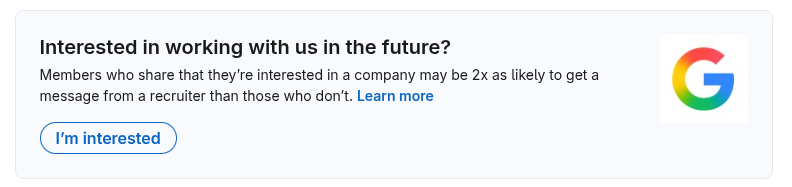
Feature description : let a company know that you are interested in working with them.
1. Retrieve the form
First you need to perform the following request, whose response will contain an object named leadGenForm. Extract the field entityUrn from that object and go to step 2.
curl --request POST \
     --url https://api.unipile.com/v2/{ACCOUNT_ID}/linkedin \
     --header 'X-API-KEY: {YOUR_API_KEY}' \
     --data '
{
  "query_params": {
    "variables": "(companyUrn:urn%3Ali%3Afsd_company%3A{COMPANY_ID})",
    "queryId":"voyagerTalentbrandDashCandidateInterestMember.d831bf85b9873ef0228a2bab19781290"
  },
  "method": "GET",
  "url": "https://www.linkedin.com/voyager/api/graphql",
  "bypass_url_encoding": true
}'
Specific variables :
COMPANY_ID: the ID of the company.
2. Submit the form
curl --request POST \
     --url https://api.unipile.com/v2/{ACCOUNT_ID}/linkedin \
     --header 'X-API-KEY: {YOUR_API_KEY}' \
     --data '
{
  "query_params": {
    "action": "submit",
  },
  "body": {
    "form": {
      "submitted": false,
      "entityUrn": {FORM_URN}
    },
  },
  "method": "POST",
  "url": "https://www.linkedin.com/voyager/api/voyagerFeedDashLeadGenForm"
}'
Specific variables :
FORM_URN: theentityUrnfield you got from step 1, url encoded.
List People You May Know
Feature description : get a list of people you may know from My Network section.
The use of this snippet requires an advanced parsing system to be able to extract valuable data from the response.
curl --request POST \
     --url https://api.unipile.com/v2/{ACCOUNT_ID}/linkedin \
     --header 'X-API-KEY: {YOUR_API_KEY}' \
     --data '
{
  "body": {
    "pagerId": "com.linkedin.sdui.pagers.mynetwork.addaCohortSeeAll",
    "clientArguments":{
      "screenId": "com.linkedin.sdui.flagshipnav.mynetwork.CohortSeeAll",
      "states": [],
      "payload": {
        "pageStart": {OFFSET},
        "pageSize": {LIMIT},
        "origin": "InvitationOrigin_PYMK_COHORT_SEE_ALL",
        "cohortReasonSource": {FILTER_SOURCE},
        "cohortReasonContext": {FILTER_CONTEXT}
        "cohortReasonRelatedSchoolUrns": [{
          "schoolId": {SCHOOL_ID}
        }],
        "cohortReasonRelatedSuperTitleUrns": [{
          "superTitleId": {JOB_TITLE_ID}
        }],
        "cohortReasonRelatedIndustryUrns": [{
          "industryId": {INDUSTRY_ID}
        }],
      }
    },
    "paginationRequest": {
      "pagerId": "com.linkedin.sdui.pagers.mynetwork.addaCohortSeeAll",
      "requestedArguments": {
        "payload": {
          "pageStart": {OFFSET},
          "pageSize": {LIMIT},
          "origin": "InvitationOrigin_PYMK_COHORT_SEE_ALL"
        }
      }
    }
  },
  "method": "POST",
  "url": "https://www.linkedin.com/flagship-web/rsc-action/actions/pagination"
}'
Specific variables :
OFFSET: an index to handle pagination. First value would be0.LIMIT: the number of results you wish to get per page.
Filter variables :
- Same school filter
FILTER_SOURCE:PYMK_SCHOOL_COHORTFILTER_CONTEXT:SCHOOLSCHOOL_ID: The ID of the school.
- Same industry filter
FILTER_SOURCE:PYMK_INDUSTRY_COHORTFILTER_CONTEXT:INDUSTRYINDUSTRY_ID: The ID of the industry.
- Same job filter
FILTER_SOURCE:PYMK_TITLE_COHORTFILTER_CONTEXT:TITLEJOB_TITLE_ID: The ID of the job.
- Recent activity filter
FILTER_SOURCE:IN_SESSION_RELEVANCEFILTER_CONTEXT:IN_SESSION_RELEVANCE
Create Sales Navigator List
Feature description : create a list on Sales Navigator to gather leads or accounts.
curl --request POST \
     --url https://api.unipile.com/v2/{ACCOUNT_ID}/linkedin \
     --header 'X-API-KEY: {YOUR_API_KEY}' \
     --data '
{
  "body": {
    "name": {LIST_NAME},
    "listType": {LIST_TYPE},
    "description": {LIST_DESCRIPTION},
    "role": "OWNER"
  },
  "method": "POST",
  "url": "https://www.linkedin.com/sales-api/salesApiLists"
}'
Specific variables :
LIST_NAME: the name of the new list.LIST_TYPE: the type of the new list :LEADorACCOUNTLIST_DESCRIPTION: the description of the new list.
Check Current Subscription
Feature description : get a list of your current subscriptions.
curl --request POST \
     --url https://api.unipile.com/v2/{ACCOUNT_ID}/linkedin \
     --header 'X-API-KEY: {YOUR_API_KEY}' \
     --data '
{
  "method": "GET",
  "url": "https://www.linkedin.com/mysettings-api/settingsApiManagePremiumAccount"
}'
Updated 3 months ago
What’s Next
Go back to the Instagram guide to continue with supported features.