
QR Code Flow
Integrate authentication for provider that requires a QR code to be scanned. A QR code have a short living time and must be refreshed when expired. Read on to implement this flow.
This flow is used by WhatsApp and Telegram
To authenticate users using the QR code flow:
- Set up a route to request a first QR Code. This route should call the Start Auth Intent endpoint.
- Implement a route to wait for the scan using the Solve a Checkpoint endpoint.
- Build a authentication page that display the QR code and wait for scan
- Handle new QR codes and refresh display if scan is not fast enough.
- Handle timeout and display a retry button.
Request first QR Code
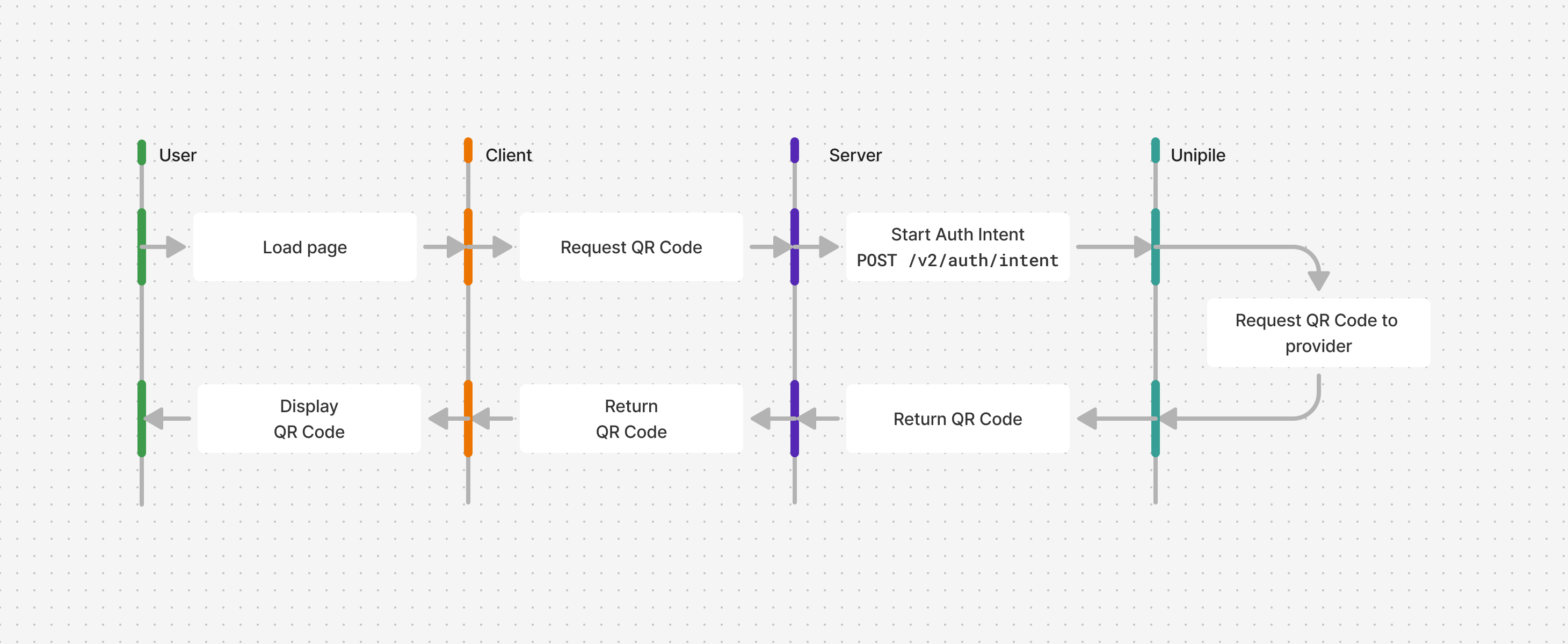
In your local application, implement an authentication page that request a QR Code for the chosen provider on load.
First, create a new route in your application to handle the request of the first QR code. This route should call Start Auth Intent with the provider and credentials.qrcode set to true.
Server Code
// index.ts

import express, { Request, Response } from "express";
import cors from "cors";
import parser from "body-parser";
import "dotenv/config";

import { UnipileCustomAuth, UnipileAccounts } from "unipile";

const key = process.env.UNIPILE_API_KEY ?? "";

const customAuthApi = new UnipileCustomAuth({ key });
const accountsApi = new UnipileAccounts({ key });

const app = express();

app.use(cors());

app.use(parser.json());
app.use(parser.urlencoded({ extended: true }));
app.use(express.json());

app.post("/auth-intent", async (req: Request, res: Response) => {
  const response = await customAuthApi.startAuthIntent({
    body: req.body,
  });

  // Handle Errors
  if (response.error) {
    res.status(response.response.status).send(response.error);
    return;
  }

  res.send(response.data);
});

app.listen(3000, () => {
  console.log("Server is running on port 3000");
});
curl --request POST \
--url https://api.unipile.com/v2/auth/intent \
--header 'X-API-KEY: api-key' \
--header 'accept: application/json' \
--header 'content-type: application/json' \
--data '
{
"provider": "telegram",
"credentials": {
"qrcode": true
}
}
'# main.py
import json
import os
from typing import Any, Optional
import unipile
import uvicorn
from dotenv import load_dotenv
from fastapi import Body, FastAPI
from fastapi.middleware.cors import CORSMiddleware
from fastapi.responses import JSONResponse, PlainTextResponse, Response
from unipile.api.accounts_api import AccountsApi
from unipile.api.custom_auth_api import CustomAuthApi
from unipile.exceptions import ApiException
load_dotenv()
key = os.getenv("UNIPILE_API_KEY", "")
configuration = unipile.Configuration()
if key:
configuration.api_key["apiKey"] = key
api_client = unipile.ApiClient(configuration)
custom_auth_api = CustomAuthApi(api_client)
accounts_api = AccountsApi(api_client)
app = FastAPI()
app.add_middleware(
CORSMiddleware,
allow_origins=["*"],
allow_credentials=True,
allow_methods=["*"],
allow_headers=["*"],
)
def _to_response_data(value: Any) -> Any:
if hasattr(value, "to_dict") and callable(value.to_dict):
return value.to_dict()
return value
def _api_exception_to_body(exception: ApiException) -> Any:
if exception.data is not None:
return _to_response_data(exception.data)
if exception.body:
try:
return json.loads(exception.body)
except json.JSONDecodeError:
return exception.body
return exception.reason or "Unknown error"
def _error_response(exception: ApiException) -> Response:
status_code = exception.status or 500
body = _api_exception_to_body(exception)
if isinstance(body, (dict, list)):
return JSONResponse(status_code=status_code, content=body)
return PlainTextResponse(status_code=status_code, content=str(body))
@app.post("/auth-intent")
def auth_intent(body: Any = Body(...)) -> Response:
try:
params = custom_auth_api._start_auth_intent_serialize(
start_auth_intent_request=body,
_request_auth=None,
_content_type=None,
_headers=None,
_host_index=0,
)
response_data = custom_auth_api.api_client.call_api(*params)
response_data.read()
response = custom_auth_api.api_client.response_deserialize(
response_data=response_data,
response_types_map={"200": "SolveCheckpoint200Response"},
).data
return JSONResponse(content=_to_response_data(response))
except ApiException as exception:
return _error_response(exception)
if __name__ == "__main__":
uvicorn.run("src.main:app", host="0.0.0.0", port=4000, reload=True)
On the client, call this route on load, then display the qrcode string of the AuthenticationQrCode using a library like qrcode.
Client Code
// lib/unipile.ts

import type {
  StartAuthIntentData,
  StartAuthIntentResponse,
} from "unipile";

export async function startAuthIntent(body: StartAuthIntentData) {
  const response = await fetch("http://localhost:4000/auth-intent", {
    method: "POST",
    headers: {
      "Content-Type": "application/json",
    },
    body: JSON.stringify(body),
  });

  if (!response.ok) {
    const error = await response.text();
    throw new Error(error);
  }

  const data = await response.json();

  return data as StartAuthIntentResponse;
}

// components/containers/QrCodeFlowContainer.tsx

import qrcode from "qrcode";
import { useEffect, useRef, useState } from "react";
import type { GetAccountResponse, StartAuthIntentResponse } from "unipile";
import { solveCheckpoint, startAuthIntent } from "../lib/unipile";

export function QrCodeFlowContainer({
  provider,
}: {
  provider: "whatsapp" | "telegram";
}) {
  const hasMounted = useRef(false);
  const canvasRef = useRef<HTMLCanvasElement>(null);

  const handleSuccess = (response: StartAuthIntentResponse) => {
    if (response.object === "AuthenticationQrCode") {
      // Display the QR Code in a canvas
      qrcode.toCanvas(canvasRef.current, response.qrcode);
    }
  };

  useEffect(() => {
    if (!hasMounted.current) {
      hasMounted.current = true;

      // Request the QR Code on page load
      startAuthIntent({
        provider,
        credentials: { qrcode: true },
      }).then(handleSuccess);
    }
  }, [provider]);

  return (
    <div>
      <h1>{provider} Login</h1>
      <canvas ref={canvasRef} width={276} height={276}></canvas>
    </div>
  );
}

// App.tsx

import { QrCodeFlowContainer } from "./components/containers/QrCodeFlowContainer";

export function App() {
  return <QrCodeFlowContainer provider="whatsapp" />;
}
Wait for scanning
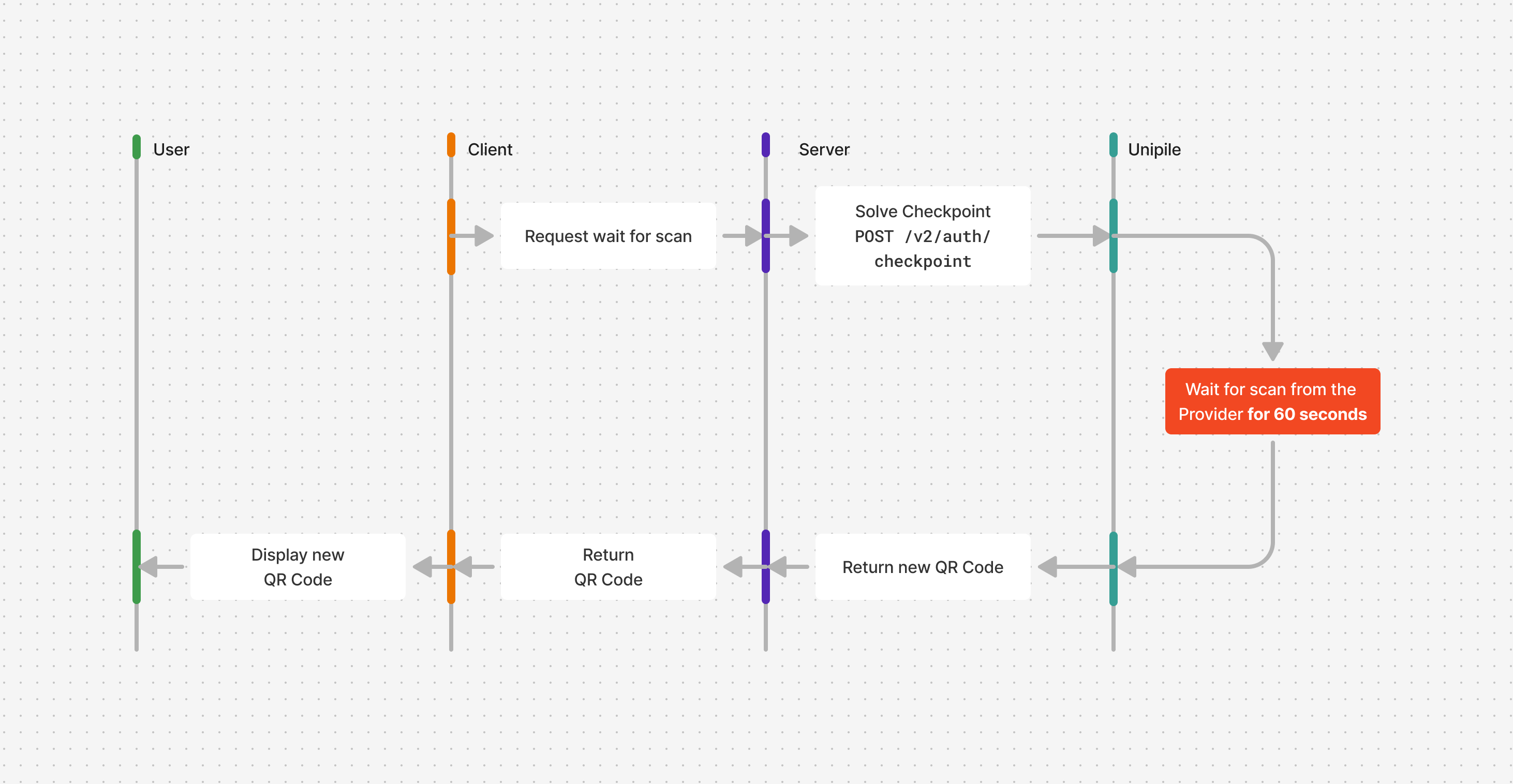
After receiving the QR code, your application should immediately begin waiting for it to be scanned.
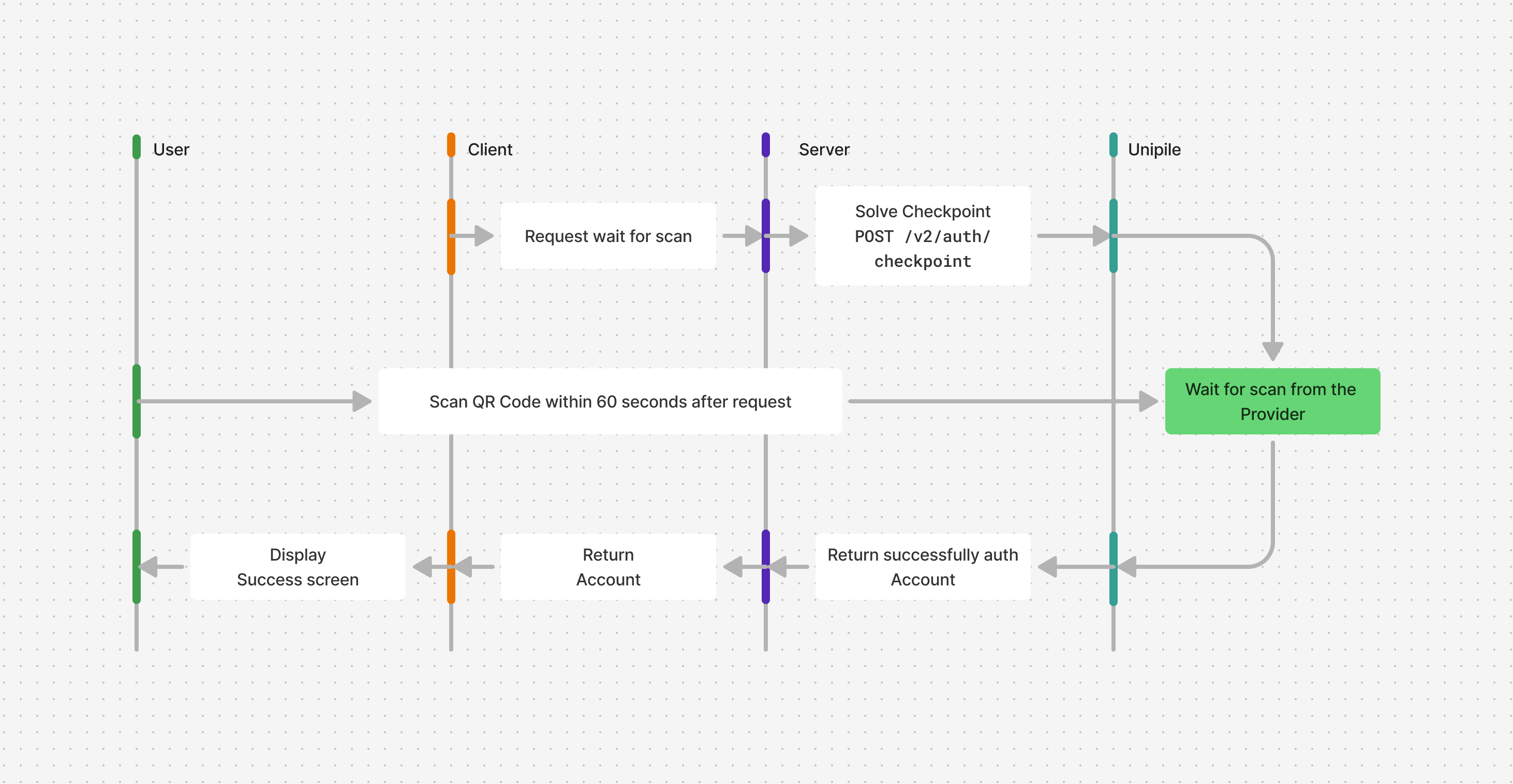
This is done by making a long polling request to the Solve a Checkpoint endpoint, using the intent_id provided by the Start Auth Intent call.
The response from Solve a Checkpoint can vary depending on the situation. Let see how to handle each response.
Server code
// index.ts

// ...

app.post("/solve-checkpoint", async (req: Request, res: Response) => {
  const response = await customAuthApi.solveCheckpoint({
    body: req.body,
  });

  // Handle Errors
  if (response.error) {
    res.status(response.response.status).send(response.error);
    return;
  }

  // Return the Account or AuthenticationQrCode
  res.send(response.data);
});

//...
curl --request POST \
--url https://api.unipile.com/v2/auth/checkpoint \
--header 'X-API-KEY: api-key' \
--header 'accept: application/json' \
--header 'content-type: application/json' \
--data '
{
"code": "",
"intent_id": "acc_123456789"
}
'# main.py
# ...
@app.post("/solve-checkpoint")
def solve_checkpoint(body: Any = Body(...)) -> Response:
try:
params = custom_auth_api._solve_checkpoint_serialize(
solve_checkpoint_request=body,
_request_auth=None,
_content_type=None,
_headers=None,
_host_index=0,
)
response_data = custom_auth_api.api_client.call_api(*params)
response_data.read()
response = custom_auth_api.api_client.response_deserialize(
response_data=response_data,
response_types_map={"200": "SolveCheckpoint200Response"},
).data
return JSONResponse(content=_to_response_data(response))
except ApiException as exception:
return _error_response(exception)
# ...
Client code
// lib/unipile.ts

import type { SolveCheckpointData, SolveCheckpointResponse } from "unipile";

//...

export async function solveCheckpoint(body: SolveCheckpointData) {
  const response = await fetch("http://localhost:3000/solve-checkpoint", {
    method: "POST",
    headers: {
      "Content-Type": "application/json",
    },
    body: JSON.stringify(body),
  });

  if (!response.ok) {
    const error = await response.text();
    throw new Error(error);
  }

  const data = await response.json();

  return data as SolveCheckpointResponse;
}

// components/containers/QrCodeFlowContainer.tsx

//...

const handleSuccess = (response: StartAuthIntentResponse) => {
  if (response.object === "AuthenticationQrCode") {
    // Display the QR Code
    qrcode.toCanvas(canvasRef.current, response.qrcode);

    // Wait for the scan
    solveCheckpoint({ code: "", intent_id: response.intent_id });
  }
};

//...
Handle new codes
If an AuthenticationQrCodeobject is returned, the QR code expired after 60 seconds without being scanned. A new QR code is issued and must be displayed to the user. The previous one is now invalid.
Client code
// components/containers/QrCodeFlowContainer.tsx

//...

const handleSuccess = (response: StartAuthIntentResponse) => {
  if (response.object === "AuthenticationQrCode") {
    // Display the QR Code
    qrcode.toCanvas(canvasRef.current, response.qrcode);

    // Wait for the scan
    solveCheckpoint({ code: "", intent_id: response.intent_id }).then(
      handleSuccess,
    ); // Recursively handleSuccess to display new QR Codes
  }
};

//...
Handle scan
If an Accountobject is returned, the user successfully scanned the QR code within 60 seconds. Authentication is complete.
For WhatsApp, scanning the QR code can first return an AuthenticationCheckpoint of type LOADING. Display a loading screen and immediately call Solve a Checkpoint again with the same intent_id and an empty code. This long request returns the linked Account when authentication finishes, or another checkpoint that your flow must handle. No user action is required during LOADING.
const [isLoading, setIsLoading] = useState(false);

const handleSuccess = (response: StartAuthIntentResponse) => {
  if (
    response.object === "AuthenticationCheckpoint" &&
    response.checkpoint.type === "LOADING"
  ) {
    setIsLoading(true);
    solveCheckpoint({ code: "", intent_id: response.intent_id }).then(handleSuccess);
    return;
  }

  if (response.object === "Account") setAccount(response);
};
Client code
// components/containers/QrCodeFlowContainer.tsx

//...

export function QrCodeFlowContainer({
  provider,
}: {
  provider: "whatsapp" | "telegram";
}) {
  const [account, setAccount] = useState<GetAccountResponse>();

  //...

  const handleSuccess = (response: StartAuthIntentResponse) => {

    //...

    if (response.object === "Account") setAccount(response);
  }

  //...

  // Display a success message if the Account is successfully linked with Unipile
  if (account) {
    return (
      <h1>
        Account {account.name || account.id} is successfully authenticated
      </h1>
    );
  }
}
Handle timeout
If a provider/timeout error is returned, the user failed to scan the QR code in time, even after multiple refreshes. The authentication process must be restarted.
For example, providers like WhatsApp or Telegram typically rotate QR codes several times before returning a timeout error.
In this case, you can hide the QR code and show a "Retry" button that initiate the same request made on page load.
Client code
// components/containers/QrCodeFlowContainer.tsx

//...

export function QrCodeFlowContainer({
  provider,
}: {
  provider: "whatsapp" | "telegram";
}) {
  const [shouldRetry, setShouldRetry] = useState<boolean>(false);

  //...

  const handleSuccess = (response: StartAuthIntentResponse) => {

    //...

    // Wait for the scan
    solveCheckpoint({ code: "", intent_id: response.intent_id })
      .then(handleSuccess);
      .catch((error) => {
        if (error.message === "provider/timeout") {
          setShouldRetry(true);
        } else {
          alert(error.message);
        }
      });
  }

  //...

  const handleRetry = () => {
    setShouldRetry(false);
    startAuthIntent({
      provider,
      credentials: { qrcode: true },
    }).then(handleSuccess);
  };

  // Display a retry button if timeout
  if (shouldRetry) {
    return <button onClick={handleRetry}>Retry</button>;
  }
}
Handle errors
Errors should be handled gracefully :
- If the user has given a custom proxy, all proxy related errors, such as
api/proxy_auth_errorfor invalid proxy credentials, andapi/proxy_errororapi/proxy_timeoutif the proxy is not working properly. - Duplicate and Restricted Accounts errors as mentioned in Accounts Linking Limitations.
- Other critical errors
Updated 3 months ago