
Scopes
Isolate connected accounts and control which accounts each API key can access.
What is a Scope?
A Scope is an isolation boundary for connected accounts within an Application. It lets you use one Application for multiple customers, workspaces, or business units while controlling which accounts each API key can access.
A Scope connects three resources:
- Accounts permanently assigned to the Scope
- Account API Keys restricted to the Scope
- Authentication flows that connect or reconnect accounts in the Scope
Service API Keys retain access to the entire Application and are used to manage Scopes and their resources. See Authenticate Requests for the complete API Key access model.
Example: If your product serves three customers, you can create one Scope for each customer. Each customer receives an Account API Key restricted to its Scope and can only access its own connected accounts.
Why Use Scopes?
Scopes are designed for multi-tenant integrations. Use them to:
- Isolate customers: Prevent one customer's API key from accessing another customer's accounts
- Delegate API access: Issue a separate Account API Key for each customer, workspace, or business unit
- Keep one Application: Share the same Application configuration, Hosted Auth settings, and webhook endpoints
- Map your data: Store your own tenant or workspace identifier in the Scope
reference - Control access temporarily: Disable a Scope without deleting its accounts or API keys
Scopes are not separate Applications. All scoped resources still belong to the same Application and share its configuration.
How Scope Isolation Works
Scope Boundary
A Scope belongs to exactly one Application. It cannot contain accounts or API keys from another Application.
An account can be:
- Unscoped, when it belongs only to the Application
- Scoped, when it is permanently assigned to one Scope
A scoped Account API Key can only:
- List accounts assigned to its Scope
- Call Methods API endpoints for accounts assigned to its Scope
- Connect new accounts to its Scope
- Reconnect accounts already assigned to its Scope
- Create Hosted Auth links that inherit its Scope
If a scoped key tries to access an account outside its Scope, the resource is not exposed to that key.
API Keys and Scope Access
A scoped Account API Key inherits one Scope and cannot access accounts outside it. Service and global Account API Keys retain Application-wide account access, while only Service API Keys can manage Scopes or assign an existing unscoped account.
For a comparison of all access levels and guidance on creating, securing, and rotating keys, see Authenticate Requests.
Scope Properties
Each Scope contains:
- ID: The Unipile identifier used in API requests
- Name: An internal name displayed in the Dashboard
- Reference: Optional metadata used to map the Scope to a resource in your system
- Status:
activeordisabled - Accounts count: The number of accounts permanently assigned to the Scope
- API keys count: The number of API keys assigned to the Scope
The reference must be unique within the Application. A common pattern is to store your own customer, tenant, or workspace ID:
{
  "name": "Acme workspace",
  "reference": "tenant_12345"
}
The name and reference are metadata only. API authorization relies on the Scope ID, not on the reference.
Creating and Managing Scopes
From the Dashboard
To create a Scope:
- Open your Application in the Dashboard
- Navigate to Scopes
- Click Create scope
- Enter an internal name
- Optionally enter a unique reference from your system
- Click Create scope
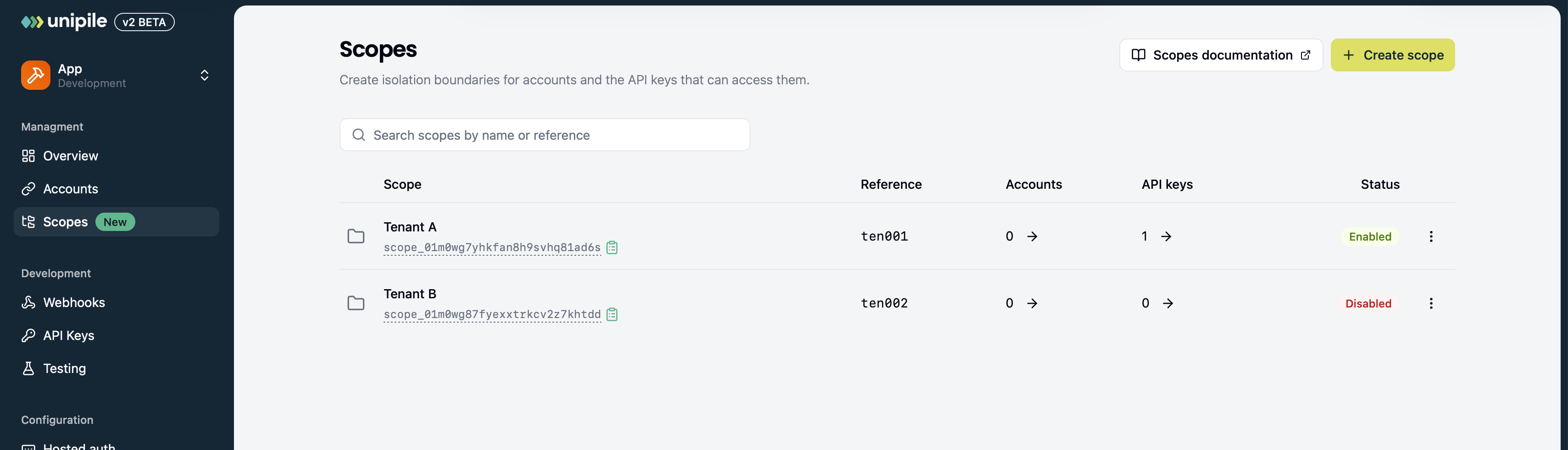
The Scopes page displays each Scope's status, account count, and API key count. Search by name or reference. Click a resource count to open the corresponding Accounts or API Keys list filtered to that Scope.
Open a Scope's actions menu to Modify its name/reference, Disable or Enable it, or Delete it when allowed. Disabled actions include a description of the required permission or resources that must be removed.
From the API
Use a Service API Key with the Scopes endpoints to:
- Create a Scope with
POST /v2/scopes - List Scopes with
GET /v2/scopes - Retrieve a Scope with
GET /v2/scopes/{scope_id} - Update a Scope with
PATCH /v2/scopes/{scope_id} - Delete an empty Scope with
DELETE /v2/scopes/{scope_id}
The list endpoint supports pagination, status filtering, and search by name or reference.
Permissions: Organization Admins and Owners can manage Scopes in all Applications. Members can manage them in Development Applications, but have read-only access in Production Applications.
Assigning Accounts to a Scope
There are three ways to assign an account to a Scope.
Connect with a Scoped Account API Key
When an authentication request is made with a scoped Account API Key, the new account automatically inherits the key's Scope. You do not need to provide account_scope_id.
If the request does include account_scope_id, it must match the key's Scope. A scoped key cannot assign an account to another Scope.
Specify the Scope During Authentication
When using a Service API Key or a global Account API Key, provide account_scope_id when:
- Starting a direct authentication flow
- Creating a Hosted Auth link
The account is assigned to that Scope once authentication completes. The Scope must belong to the same Application and must be active.
{
  "account_scope_id": "scope_id",
  "expires_on": "2026-09-01T12:00:00.000Z",
  "redirect_uri": "https://example.com/auth/callback",
  "providers": ["linkedin"]
}
Assign an Existing Unscoped Account
From the Dashboard, open an unscoped account's actions menu, choose Assign to Scope, select an active Scope, and confirm Assign permanently. See Manage Provider Accounts.
A Service API Key can assign an existing unscoped account by updating the Account with account_scope_id.
{
  "account_scope_id": "scope_id"
}Permanent assignment: Once an account has a Scope, its Scope cannot be removed or replaced. Verify the target Scope before connecting or updating the account.
This permanent relationship prevents a tenant's account from being moved accidentally into another tenant's access boundary. If an account was assigned to the wrong Scope, remove the account and connect it again in the correct Scope.
Creating Scoped API Keys
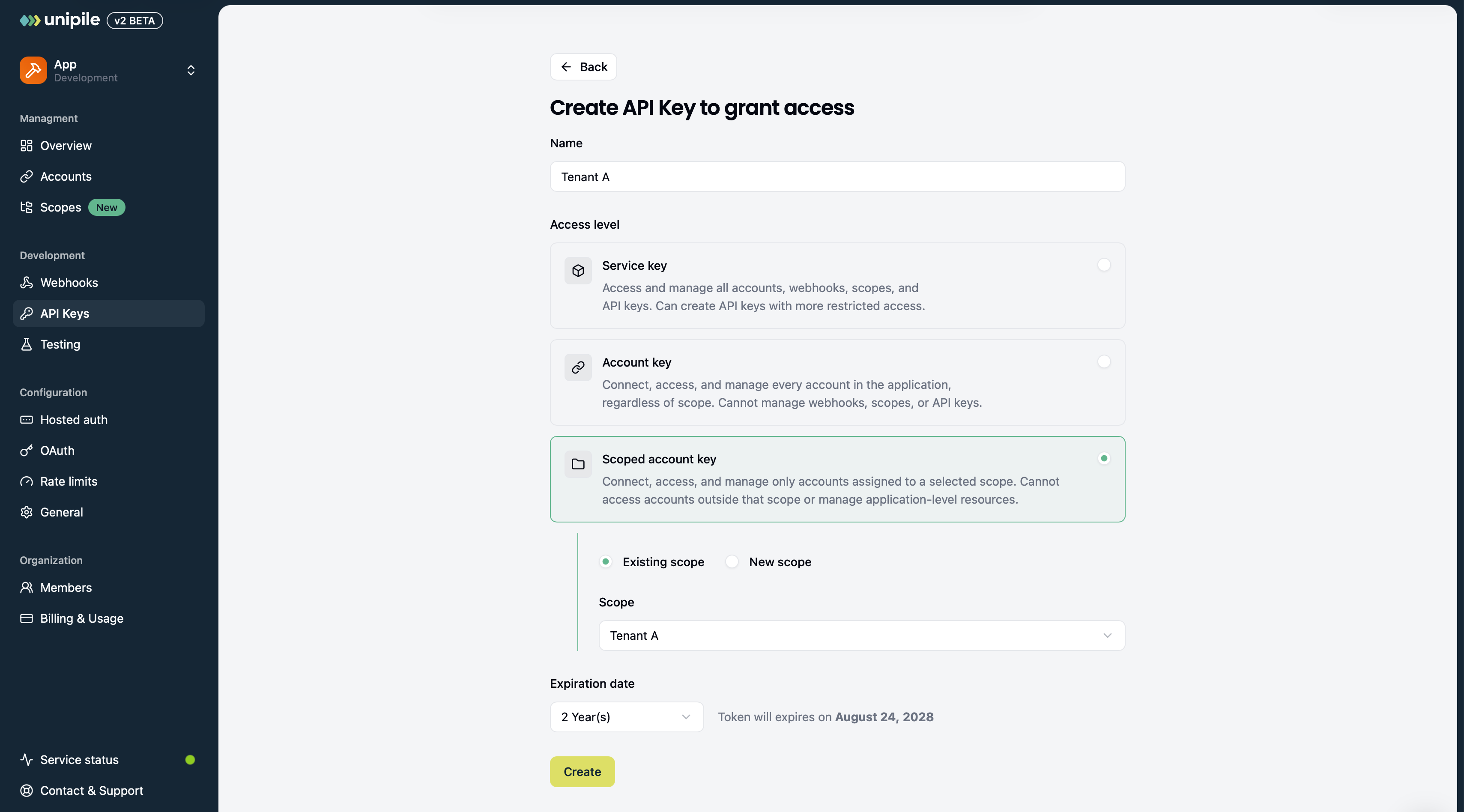
Create a scoped Account API Key from the Dashboard or with a Service API Key. Select the Scope that defines its account access boundary.
See Creating Account API Keys with the API for request examples, token handling, expiration, and rotation.
Listing and Filtering Accounts
The behavior of GET /v2/accounts depends on the API key:
- A scoped Account API Key automatically returns only accounts in its Scope
- A Service API Key or global Account API Key returns all accessible accounts by default
- Use
account_scope_id={scope_id}to filter accounts assigned to a specific Scope - Use
account_scope_id=noneto return only unscoped accounts
Account objects include account_scope_id when they are assigned to a Scope. This lets your backend verify and store the association.
See API Key Access Levels for the operations available to each type of key.
Hosted Auth and Reconnection
Scopes remain attached throughout the authentication lifecycle.
- A Hosted Auth link created with a scoped key inherits that key's Scope
- A Hosted Auth link created with a Service or global Account API Key can receive
account_scope_id - The Hosted Auth session cannot switch to another Scope
- Reconnecting an account does not change its Scope
- A scoped key can only reconnect an account from the same Scope
Generate a separate Hosted Auth link for each end user. Do not reuse a link created for one Scope in another tenant's flow.
Disabling and Enabling a Scope
Set a Scope's status to disabled when you need to suspend a tenant without deleting its resources.
While a Scope is disabled:
- API keys assigned to the Scope are blocked
- New authentication and Hosted Auth flows for the Scope are blocked
- The accounts remain connected and permanently assigned
- The API keys remain associated with the Scope
Re-enable the Scope by setting its status back to active. Its scoped keys and authentication flows can then be used again, provided the keys have not expired.
Disabling a Scope is reversible. It is the recommended way to suspend scoped access temporarily.
Deleting a Scope
Before deleting a Scope:
- Remove every account assigned to it.
- Delete its API keys, including expired keys.
- Open the Scope's actions menu, choose Delete, and confirm.
For the API equivalent, see Delete a Scope.
Because account assignments are permanent, you cannot make a scoped account unscoped before deletion. The account itself must be removed.
See Listing and Deleting Account API Keys to remove the keys attached to the Scope.
Warning: Deleting a Scope cannot be undone. Its former reference can be reused after the Scope has been deleted.
Recommended Multi-Tenant Workflow
For each tenant in your product:
- Create a Scope with your tenant ID as its
reference - Create a scoped Account API Key with an appropriate expiration date
- Store the Scope ID and API key securely against the tenant in your database
- Create authentication links with the tenant's scoped key
- Use the same scoped key for that tenant's Methods API requests
- Route webhook events using
account_scope_id - Disable the Scope when access must be suspended
This model keeps tenant access isolated while allowing you to manage shared Application settings in one place.
Updated about 13 hours ago